
Table of Contents
Why This Matters #
Transparency builds trust. HRSimplified gives you full visibility into your requests so you always know where things stand—no follow-ups needed.
📍 Where to Find Your Requests #
Go to:
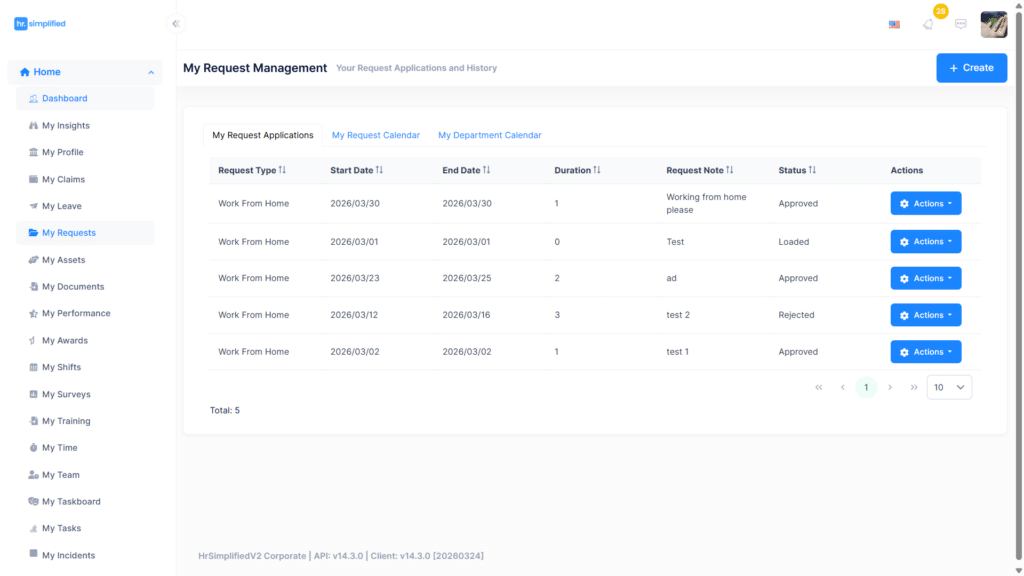
Home → My Requests
📊 View Request Applications #
Here you’ll see:
- Request Type (Work From Home)
- Start & End Dates
- Duration
- Notes
- Status (Approved, Rejected, Pending)
📅 Use the Calendar View #
Switch to:
- My Request Calendar
- My Department Calendar
This allows you to:
- See your remote work days visually
- Understand team availability
- Plan better collaboration
🔄 Understanding Statuses #
- Approved → You’re good to go
- Rejected → Not approved (check feedback if available)
- Pending/Loaded → Awaiting manager action


