
Why this matters #
At HRSimplified, we believe that giving employees flexible ways of working helps businesses perform better. The Remote Work Request feature makes it easy for employees to request Work From Home, while giving managers clear visibility to review and approve requests quickly and fairly.
What is the Remote Work Request feature #
This feature allows employees to submit Work From Home requests directly from their dashboard. Each request is sent to their manager for approval through a structured workflow, ensuring transparency and consistency across the organisation.
Employees can track their requests at any time, while managers can view and manage requests for their teams in one place.
How it works #
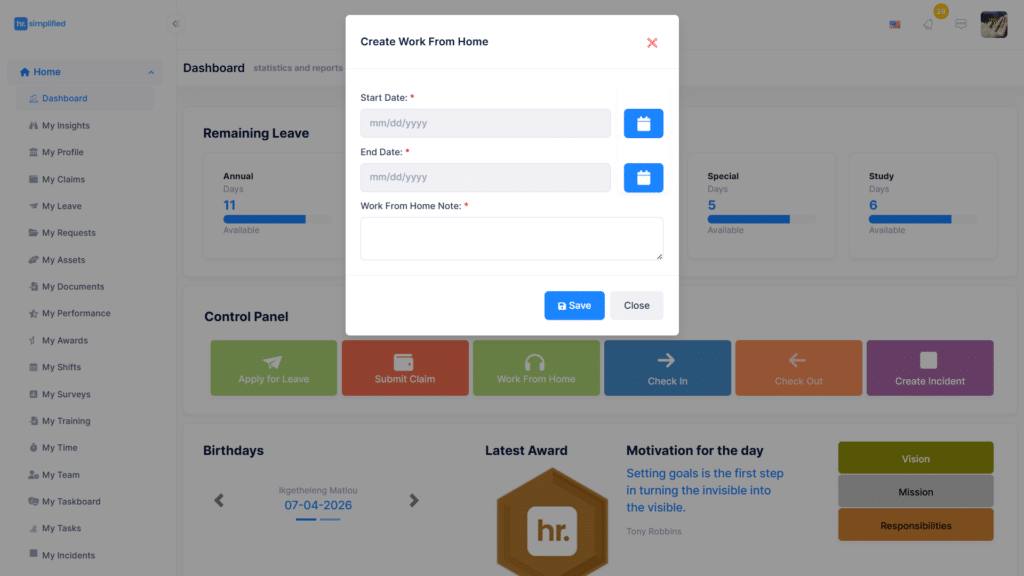
Employees submit a Work From Home request by selecting dates and adding a short note.
The request is automatically sent to their manager.
Managers review and approve or reject the request.
Employees can track the status and view their requests on a calendar.
Key benefits #
The process is quick and easy with no emails or paperwork required.
Employees always know the status of their requests.
Managers have full visibility of team availability.
All requests follow the company’s reporting structure for proper approval control.
Where to access it #
Employees can submit requests from the Dashboard and track them under My Requests.
Managers can review requests under Employee Requests.
Frequently Asked Questions #
How do I request work from home in HRSimplified?
You can submit a request from your dashboard using the Work From Home button and completing the request form.
Can I track my remote work requests?
Yes, all requests and their statuses are available under My Requests, including calendar views.
Who approves work from home requests?
Requests are automatically sent to your direct manager based on the company hierarchy.


